最近要登入 google compute engine 發現要用 ppk 檔才能使用 ftp
所以就找了教學 順便紀錄一下
ying5320 發表在 痞客邦 留言(0) 人氣(0)
WARNING: The vboxdrv kernel module is not loaded. Either there is no module
available for the current kernel (4.18.0-17-generic) or it failed to
load. Please recompile the kernel module and install it by
sudo /sbin/vboxconfig
ying5320 發表在 痞客邦 留言(0) 人氣(11)

進入 /etc/profile.d 目錄
# cd /etc/profile.d
ying5320 發表在 痞客邦 留言(0) 人氣(47)
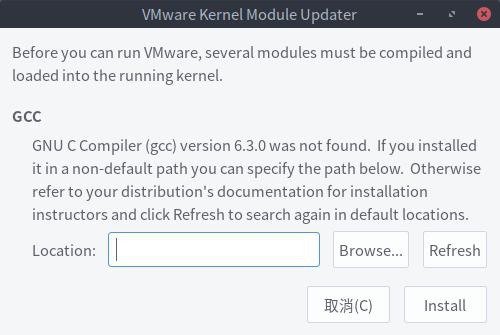
在ubuntu 17.04安裝好vmware workstation之後會出現下面這畫面
ying5320 發表在 痞客邦 留言(0) 人氣(399)
在命令列打上
# cat /etc/*release*
ying5320 發表在 痞客邦 留言(0) 人氣(5)
1..首先,先安裝Development Tools套件
# yum groupinstall "Development Tools"
2.安裝httpd-devel與gnutls-devel套件
# yum install httpd-devel gnutls-devel
3.到mod_gnutls網站下載最新的module
http://www.outoforder.cc/projects/apache/mod_gnutls/
4.接著把mod_gnutls解壓縮
# tar -xjvf mod_gnutls-版本號.tar.bz2
# cd mod_gnutls-版本號
# ./configure --prefix=/usr
# make
ps:(1)如出現libguntls套件版本太舊,請至http://www.gnu.org/software/gnutls/download.html
下載2.0以上版本compile並安裝(./configure && make)
(2)mod_gnutls千萬別用Make instll,因為它只是一個module
5.將編譯好的module,copy到/usr/lib/httpd/modules目錄底下
# cp mod_gnutls-版本號/src/.libs/libmod_gnutls.so /usr/lib/httpd/modules/mod_gnutls.so
6.接著把/etc/httpd/conf.d/ssl.conf加入以下設定檔
LoadModule gnutls_module modules/mod_gnutls.so
GnuTLSCache dbm "conf/gnutls_cache"
GnuTLSCacheTimeout 300
7.虛擬網站設定
NameVirtualHost 192.168.0.1:443
<VirtualHost sample1.ex.com:443>
ServerName sample1.ex.com:443
GnuTLSEnable on
#Set TimeOut for SSL Session Cache
GnuTLSCacheTimeout 300
GnuTLSCertificateFile /etc/pki/tls/certs/localhost.crt
GnuTLSKeyFile /etc/pki/tls/private/localhost.key
GnuTLSPriorities NONE:+VERS-TLS1.0:+AES-128-CBC:+RSA:+SHA1:+COMP-NULL
DocumentRoot "/var/www/sample1"
<Directory /var/www/sample1/>
Order Deny,Allow
Allow from All
</Directory>
</VirtualHost>
<VirtualHost sample2.ex.com:443>
ServerName sample2.ex.com:443
GnuTLSEnable on
#Set TimeOut for SSL Session Cache
GnuTLSCacheTimeout 300
GnuTLSCertificateFile /etc/pki/tls/certs/localhost.crt
GnuTLSKeyFile /etc/pki/tls/private/localhost.key
GnuTLSPriorities NONE:+VERS-TLS1.0:+AES-128-CBC:+RSA:+SHA1:+COMP-NULL
DocumentRoot "/var/www/sample2"
<Directory /var/www/sample2/>
Order Deny,Allow
Allow from All
</Directory>
</VirtualHost>
8.重新啟動Apache伺服器
# /etc/rc.d/init.d/httpd restart
9.測試可否使用
https://sample1.ex.com/
https://sample2.ex.com
ying5320 發表在 痞客邦 留言(0) 人氣(235)
安裝: RPMforge
下載: http://apt.sw.be/redhat/el5/en/i386/RPMS.dag/rpmforge-release-0.3.6-1.el5.rf.i386.rpm
[root@idw ~]# wget http://apt.sw.be/redhat/el5/en/i386/RPMS.dag/rpmforge-release-0.3.6-1.el5.rf.i386.rpm
驗證: rpm -K rpmforge-release-0.3.6-1.el5.rf.i386.rpm
匯入: DAG's GPG key: rpm --import http://dag.wieers.com/rpm/packages/RPM-GPG-KEY.dag.txt
[root@idw ~]#
rpm --import http://dag.wieers.com/rpm/packages/RPM-GPG-KEY.dag.txt
安裝: [rpm -i rpmforge-release-0.3.6-1.el5.rf.i386.rpm
[root@idw ~]# rpm -i rpmforge-release-0.3.6-1.el5.rf.i386.rpm
安裝: yum install yum-priorities
[root@idw ~]# yum install yum-priorities
編輯: /etc/yum/pluginconf.d/priorities.conf檔案
[root@idw ~]# vi /etc/yum/pluginconf.d/priorities.conf
[main]
enabled=1
編輯: /etc/yum.repos.d/Centos-Base.repo檔案
[root@idw ~]# vi /etc/yum.repos.d/Centos-Base.repo
最後一行寫入
priority=1
存檔並離開
如: base, addons, updates, extras.. priority=1
centosplus,contrib.. priority=2
安裝: yum install fuse fuse-ntfs-3g dkms dkms-fuse
[root@idw ~]# yum install fuse fuse-ntfs-3g dkms dkms-fuse
rpmforge repo 預設是關閉
開啟跟安裝: yum --enablerepo=rpmforge install fuse fuse-ntfs-3g dkms dkms-fuse
下達此指令
[root@idw ~]# mount -t ntfs-3g /dev/sda1 /mnt/sda1
這樣就可以讀到NTFS檔案系統
ying5320 發表在 痞客邦 留言(0) 人氣(162)
首先,先將sendmail元件移除(或是停止服務[root@host ~]# /etc/rc.d/init.d/sendmail stop)
[root@host ~]# rpm -e sendmail 或是[root@host ~]# yum remove sendmail
再來使用查詢套件的指令檢查是否有安裝下列套件
cyrus-sasl cyrus-sasl-plain, cyrus-sasl-md5, syrus-sasl-gssapi, procmai
(預設安裝應該都會安裝上去)
再來使用yum安裝下列套件
[root@host ~]# yum install imap, imap-devel, postfix
將/etc/postfix/main.cf.default這個檔案複製一份為/etc/postfix/main.cf
[root@host ~]# cp /etc/postfix/main.cf.default /etc/postfix/main.cf
找到以下字串並進行適當修改
# 設定本機的 host name
myhostname = idw.myvnc.com
# 設定 domain 網域
mydomain = myvnc.com
# 設定幫忙 relay 的 hosts
mynetworks = 192.168.0.0/24, 127.0.0.0/8
# 設定本機要接收的 mail, 同 sendmail 的 local-host-names
mydestination = myvnc.com
接著啟動postfix服務,並於開機時啟動
[root@host ~]# /etc/rc.d/init.d/postfix start
查看服務是否有正常啟動25 port
[root@host ~]# netstat -tlunp | grep :25
tcp 0 0 127.0.0.1:25 0.0.0.0:* LISTEN 5036/master
接下來安裝dovecot
[root@host ~]# yum install dovecot
修改/etc/dovecot.conf設定檔
# 修改 protocos 參數, 提供 pop3和imap
protocols = pop3, imap
接下來啟動dovecot服務
[root@host ~]# /etc/rc.d/init.d/dovecot start
查看是否有正常啟動110 port
[root@host ~]# netstat -tlunp | grep :110
tcp 0 0 :::110 :::* LISTEN 4971/dovecot
這樣就大功告成囉
ying5320 發表在 痞客邦 留言(0) 人氣(59)